<?xml version="1.0" encoding="utf-8"?><feed xmlns="http://www.w3.org/2005/Atom" ><generator uri="https://jekyllrb.com/" version="3.10.0">Jekyll</generator><link href="https://arbel.net/feed.xml" rel="self" type="application/atom+xml" /><link href="https://arbel.net/" rel="alternate" type="text/html" /><updated>2026-10-09T09:54:41+00:00</updated><id>https://arbel.net/feed.xml</id><title type="html">Eli Arbel</title><subtitle>Principal Software Engineer at Microsoft</subtitle><entry><title type="html">*N Async, the next generation</title><link href="https://arbel.net/2016/08/10/n-async-the-next-generation/" rel="alternate" type="text/html" title="*N Async, the next generation" /><published>2016-08-10T15:28:38+00:00</published><updated>2016-08-10T15:28:38+00:00</updated><id>https://arbel.net/2016/08/10/n-async-the-next-generation</id><content type="html" xml:base="https://arbel.net/2016/08/10/n-async-the-next-generation/"><![CDATA[<p>In the <a href="/2010/11/12/n-async-part-1/">previous installment</a>, I discussed how to use iterators (<code class="language-plaintext highlighter-rouge">yield return</code>) to create async methods. This time, we’re about to do almost the opposite – use async methods to implement async iterators.</p>

<!--more-->

<p>Here’s what it looks like:</p>

<div class="language-csharp highlighter-rouge"><div class="highlight"><pre class="highlight"><code><span class="k">public</span> <span class="k">static</span> <span class="k">async</span> <span class="n">AsyncEnumerable</span><span class="p">&lt;</span><span class="kt">int</span><span class="p">&gt;</span> <span class="nf">GetValuesAsync</span><span class="p">()</span>
<span class="p">{</span>
    <span class="k">for</span> <span class="p">(</span><span class="kt">int</span> <span class="n">i</span> <span class="p">=</span> <span class="m">0</span><span class="p">;</span> <span class="n">i</span> <span class="p">&lt;</span> <span class="m">5</span><span class="p">;</span> <span class="n">i</span><span class="p">++)</span>
    <span class="p">{</span>
        <span class="k">await</span> <span class="n">Task</span><span class="p">.</span><span class="nf">Delay</span><span class="p">(</span><span class="m">200</span><span class="p">);</span>
        <span class="k">await</span> <span class="n">Task</span><span class="p">.</span><span class="nf">FromResult</span><span class="p">(</span><span class="n">i</span><span class="p">).</span><span class="nf">YieldReturn</span><span class="p">();</span>
    <span class="p">}</span>

    <span class="k">return</span> <span class="k">default</span><span class="p">(</span><span class="kt">int</span><span class="p">);</span> <span class="c1">// dummy value</span>
<span class="p">}</span>
</code></pre></div></div>

<h2 id="what-are-async-iterators">What are async iterators?</h2>

<p>In .NET we use the <code class="language-plaintext highlighter-rouge">IEnumerable&lt;T&gt;</code> and <code class="language-plaintext highlighter-rouge">IEnumerator&lt;T&gt;</code> interfaces to create forward-only iterators. The enumerator interface contains a <code class="language-plaintext highlighter-rouge">bool MoveNext()</code> method, that when called, advances the iterator to the next item.</p>

<p>Async iterators replace this method with <code class="language-plaintext highlighter-rouge">Task&lt;bool&gt; MoveNext()</code>, so that each step can be performed asynchronously. This is useful when the next item should be retrieved asynchronously – mainly because it incurs IO, such as when iterating over <strong>Entity Framework</strong> entities (materialized from a <code class="language-plaintext highlighter-rouge">DbDataReader</code>) and <strong>Service Fabric</strong> Reliable Collections (which may require disk IO if the items are not in memory). Both of these frameworks expose their own <code class="language-plaintext highlighter-rouge">IAsyncEnumerable&lt;T&gt;</code> and <code class="language-plaintext highlighter-rouge">IAsyncEnumerator&lt;T&gt;</code>, which work as I just described.</p>

<p>The <a href="https://github.com/dotnet/reactive">RX project</a> has yet another <a href="https://www.nuget.org/packages/System.Interactive.Async">implementation for async enumerable</a>, which also provides a full LINQ implementation, so you can use operators such as <code class="language-plaintext highlighter-rouge">Where</code> and <code class="language-plaintext highlighter-rouge">Select</code>.</p>

<h2 id="language-support">Language support</h2>

<p>Unfortunately, C# is lagging a bit behind. While it does support creating iterators using <code class="language-plaintext highlighter-rouge">yield return</code> and async methods using <code class="language-plaintext highlighter-rouge">async</code> and <code class="language-plaintext highlighter-rouge">await</code>, currently there’s no way to combine the two. Or is there?</p>

<p>Roslyn 2.0 introduced a very nifty feature – “<a href="https://github.com/dotnet/csharplang/blob/main/proposals/csharp-7.0/task-types.md">arbitrary async returns</a>”. This was added mainly to address some allocation optimizations when dealing with Tasks (which are reference types) by providing an awaitable value type that defers the creation of the task until absolutely necessary, called <code class="language-plaintext highlighter-rouge">ValueTask</code>. But the compiler feature is much more flexible than that – it enables us to create custom “async method builder” classes that allow returning any type from an async method.</p>

<p>I realized this feature could be somewhat <em>abused</em> to create async iterators, as seen in the above example.</p>

<h2 id="how-does-it-work">How does it work?</h2>

<p>There are two main pieces:</p>

<ul>
  <li>A <code class="language-plaintext highlighter-rouge">YieldReturnAwaitable</code> which the extension method <code class="language-plaintext highlighter-rouge">YieldReturn()</code> returns. This awaitable/awaiter just wraps the task’s awaiter, except for the <code class="language-plaintext highlighter-rouge">IsCompleted</code> property, which always returns <code class="language-plaintext highlighter-rouge">false</code>.</li>
  <li><code class="language-plaintext highlighter-rouge">AsyncEnumerableTaskMethodBuilder&lt;T&gt;</code> which allows the compiler to create the async state machine. It works differently from the task method builder, because when returning an enumerable, it can be invoked multiple times by calling <code class="language-plaintext highlighter-rouge">GetEnumerator()</code>. Also, the async state machine’s <code class="language-plaintext highlighter-rouge">MoveNext()</code> is not invoked automatically, but rather by the enumerator’s <code class="language-plaintext highlighter-rouge">MoveNext()</code>.
    <ul>
      <li>The state machine is started by calling <code class="language-plaintext highlighter-rouge">AsyncEnumerator&lt;T&gt;.MoveNext()</code>. A <code class="language-plaintext highlighter-rouge">TaskCompletionSource&lt;bool&gt;</code> is created to hold the return value of <code class="language-plaintext highlighter-rouge">MoveNext()</code>.</li>
      <li>Each time there’s an <code class="language-plaintext highlighter-rouge">await</code> in the method, the <code class="language-plaintext highlighter-rouge">AwaitOnCompleted</code> gets called (unless it completes synchronously). That’s why <code class="language-plaintext highlighter-rouge">YieldReturnAwaiter.IsCompleted</code> always returns <code class="language-plaintext highlighter-rouge">false</code> - otherwise the state machine would skip <code class="language-plaintext highlighter-rouge">AwaitOnCompleted</code> for completed tasks, and we’d never get a chance to intercept the yield. If it’s our special <code class="language-plaintext highlighter-rouge">YieldReturnAwaiter</code>, we stop executing and set the <code class="language-plaintext highlighter-rouge">MoveNext()</code> task result to <code class="language-plaintext highlighter-rouge">true</code>. We also fetch the value using the awaiter’s <code class="language-plaintext highlighter-rouge">GetResult()</code> method. Otherwise (as in the <code class="language-plaintext highlighter-rouge">Task.Delay()</code> in the example), we just hook up the continuation and let it continue until hitting the next “yield return”.</li>
    </ul>
  </li>
</ul>

<p>There’s a small “type safety” issue – the compiler won’t stop us from using <code class="language-plaintext highlighter-rouge">YieldReturn()</code> on any type in the method. But of course we only take values from yields that match the method’s return type.</p>

<p>Lastly, this is just a <strong>prototype</strong>. I’ll have to review it more thoroughly to make sure it’s thread safe. I’m also not sure if <code class="language-plaintext highlighter-rouge">ExecutionContext</code> capturing was done correctly.</p>

<p>You can see the full implementation in <a href="https://sharplab.io/#v2:CYLg1APgAgTAjAWAFBQAwAIpwHQGED2AtgA74B2ApmQC4Cy+wFANgNzJqY4BKArjQJaEKeIsX5MKAJwDKUgG78AxhQDObFBizZZinpP7UAnuo5aAKgAtJFAIbB+ZAOYnNcAKzrkZG0JXEbyugAgiqGZIoAomQ8QpI2AEYSAOJUUjbU+JJmqtTIAN7I6EWYMJwA7IXFBUjFtZwAbJgALOi0Ng4AFFioANoAuug2ko4qAJSVdejVk5O8ZB2j2ADq7dQL6jPoAL7IE3XE+nLpFA2YAByYjXMLe7XTm8VHkuhUMWmJJwC86CnUAGo2Jg8VQhMKKda3GZQACc6AACvoaB1XrEEhJRhsHkUYfDEWsUe90ZjJjskJCigd+EdqCcsI0oBcoI0EQ41qDwlE3nEPgAeVkAPhe0VRH3GNRm9yxTyFXPSmXQ3wJ3Ik2F+nNRGUkEPFWIA7hZxCcurClXLJNh6HIKAA5CgADzWozFWKKkpd2Lg0ORwrSmrwemsNAx5LqpM2pJDUAAzKcGcFQhyfcqKHyaILfgCgSCE+DnRKQ7UAGbyjqs9D8BXoVAscvoHnoDzlsBgPNYt3unFM7AAEWYNkMHRgqFQwZ17swsK71wWCsF/EWAE1+MxgFwKNQ9PNR+6I2PNlAyuhGIWbDwmGtWRj0AB6a9HmKEQzoI5ZkNh4q72rR8s0KQnwIAJLspESZoimZj8ns7bFEBObqr6mQ8hBPzrvBcSatqtTvkUezfqyf4BCcsFgmhZpIYKIDoAB3b8H4+AqGBUEhmY6C4AGVDUFM6COOuNbYXUTI8vE+D4EwgqWja9prLgNjhMwTDpPw5BmPgADWVDoIosnKEwCnUEpZAqepZCVsep7nh0MlybpinKWpVBOsSdR7PxuExnSJToEuK5rhukhkBEDpUCoBkqExe7FN+HneUwq7rpuQS6qsYHkV5y6xb5m7kR01AGiolypdQNgqKprZ1NBkwHuglC6mlPnxf5iXJbyEE5cVpVOVhLm7GO34qNQkg8IonExXFflkE1BgpWYa4qGe1CQWOFXoJS1InNYdjkEwT6CTNqjzYKAD6RUlZ4EXYjGo2ZY1SVTR8XT1Ehs0HegJ2lSGy21Md7WVm9nUfj1+6XelY0JbdNLPL8k0QzOnyCjVdUZQ1E3g1IHTfSVo6RjG/WDcNiOgzdqxSOglEAbg+j6VpTDWvg+mFoYBAkBI+nkAANFRtP04zogswZH0FsUq3HOgG3AFtO31NDUhPft55HTCUhne6t7loW6C6rSh4DcCHO5Sc/Ui4QAQGpQGv4GewDoCV/DEJpgJMA4jjBODADyZBM8QLMUMAgtFKrslW5r5tkAA5Jx8QnGBr34JwiDnXUqsOP1thBycigWBQiiqVRKie97wAAb+/mAj+r2Zy7qzoEIuUMDH6D4MQ+mEPwABeJz65p5D6dEtlkH7mAxsJom5/n64+7O6AnkwKgUMrLr4SXTDoMPy8AXnvPj4XxfeMvcPoIdivmuvY80sA89Yovu8E9dKPE1qu3PfLr3tWVmyfTMh/QiT3xvaq67Sy1NuF0n4XQ9B0HoAwhhpA2ELBQCmBglCAj6APKKLR3anx9l0OApRFDdwcDwPuoxJ5fykNgDBm8z4dDwQIXurMyBYwTrUcBWdIFGAQVTZBqD3ItAAKpkAYnAihzMt7YNwfguhBliH71IeafhgiKDCK9qImhPdCH0MYR2GMe05rnhQtQJ+joSFH3/gYuWjp/pFH4qAooPRgK0HXBYBgAAhHg4hGBaiMMQCg+BCwdGAqRD4TIHG12AK49xMt+ROhQb1HGtgJBW1gPGEioEWoUSogE1JEhyLhU2MLGkyTEyyiCfUEJTiwluNijLZCh14iVI8RfOoV9S6ZOKRIfxcEskUGCY4lx9TqmCjqREyQb8qgD1qf0543whlVMkJY7YgMoQxmIkUjUiFkJqlAhhaRR0ZkeNMaRbZTkbGD08q0kUEgemhPCbMnJS0Qz5JOCxQ6uhJCBmoPMx5GSczSCKjSNoGcHAnEOobf5JsgWfMOCLJkp8DLSAtpIZQQkRJiQPtQRQagHlQoKVdZG0Npr8mwLi8agCAD8B8sBwFvoAxpX53JwEaOcwk3TSm9IqcM1KFNbA0lhvDCgtUmXJiueUm5HjsqaKWc0dAvyhjUCQjKsFgLKD8g6NYdWZgFUUABabA2fytXgsoMQ/UUgnmau1UC0m3ywRmoNRQAWTDiggr1eas23xQX6qVXPN8izKo8OleuG1nqOgrMUIGnV1tnW2tGa6b1ZIE5oP9WY3RawWLWGTdGqYA8k6ODIJkDuFc03zWfICYEPqHj8HVujdF+UACE3xoi6QzXcAeX1q3YDMJIaB65DEdGnrPYBWJ+JdTjUDKVshqCBWUE3AyHRJ0UGneQF4dop0aPte6Ct6Aq0YvQHW6qZ4mBNrGQ6yYx0MXts7eOudC75j2hXVI+Zw7wxlrpYUkCbTwKCiZJPBGgqCU5TyhK31UroZKILkhQBHMNWRs9SqtV6AzCAInFIDmcGoPHBdbq9DUaB7GusPBxDZMuYVp5iI+hOHM54bQ4q8NZNgJhqBWul00NVUUHVkfFDrGI1Yc9QO0Mz7Ip+uhvI2BiiPaUJ9uB1GkhIP0eVSx9ViH2Oi041Rj14b3UYcPUUXDTyCNUQ4UgmmdNiOwvIORk18HZMnFoz86DOrGNYmY3BpTcGNNRvmSc2oXyoAtGhpJ++Mm7NAtgypxT39pPKfVVZrj1GgVaY1hR3TUnLUASIwzUz/dj0JYs6pjDKW6NBcoA5h4h84BUrxcl74R9Bj5WJWDZq2SIJEpBtSqTpKH3FA3ejSlrX76kuwCfcT28IbX0+L/QaFB4sf0mEXOQ9kJK2gdJhEBA9mCzwHtNuo0pBpkEoFM6q/LWj4CtItgxfA9uzrtKw+hBBfwOjwDYJuegKALA5k67jOq9YAY65VcL5CxOkawby0W52yHXEcgPIdAMR0zG8y0Wb83juSSWxmzbXXSvlZJZV+t+6pstsdW5z1FokeneW+OTAZQfsLKywNQwG38dFBeexGglYMe9YMGQzMwJTE9t4+6U9Khz1dqTfNHKE2+czCh5MLS6KLCbqvfQpdeOsutrPR24XCuZ32glySWNIZmlr1/ZqVKmzZTbOK/uQ8P7Olm8yP+2iOvqdYqpCLWegIJ5JKN/KGzKTbeSDue/AeXzf0lLKX0jlNS9lK340Br3WoQ+XNZdcyZqUo8jPpyrx1afKxp6p55yVLE2JvI4iQtP2AmfF5oLSyVPn0A0TorPG4WXNv56A4JVe4kSdSUstpeSfcjIaS0tZPSBkB8MIz+TxnZeBeVgRjCyhcKEVIo72T8cEzhnl8Jzq4nJ3u+O8twfafbamR571wnL5buEmeQW1JOYe2Lew+xetVOEt0CBWuwZW7NIHQH1UVJavkwXyYsr+Ia0W72sWlAAB+wT+pwX+UkMkuk8QAQOch0Dgc26kN+DoUBXmMBwBZA20r6gSieYe7Ktykeky2BnWO8pcmBZ2u2aM7+ugN23cUkXcd21AHMoBhWmGEBFAHMCeLKJBoqAyK8kyyuk+v+LBP+3wf+WBDOB8W+Fqbq3BVOX02e0yFBkOMeTS1By8te4OE+k+6OshnEu6DaB68hm2mwtO8hzameWIcBDoCBTASB2cbB3+1AzhrhOc3wqBZA6BWqXech9h5alaJhXhyBCoOOjath+YIR7o4RDs3hlY6MaBiOu+0hB2tUjhnhSRyBwa/h6RyO1AEO8RkusRkwjBPAzB7B2A1wLyUhHB7h8BeR2cb2ae++k+B4qh5RZRRQhYDgDsdOfRmaIxX0JhPYtEpAjenRg68hUuJWZeCOGBQRFiWhMOWI3mDKUqyxgRGRaw+A8QAAVlnBHGIYYeTh0B0r7hcoIWysIf7hBKMB0QNoUSsfsavk+gnNYsgKSEAA=">SharpLab</a>.</p>]]></content><author><name></name></author><summary type="html"><![CDATA[Building async iterators years before C# 8 added them.]]></summary></entry><entry><title type="html">Simple access to Roslyn’s internals</title><link href="https://arbel.net/2016/03/27/simple-access-to-roslyns-internals/" rel="alternate" type="text/html" title="Simple access to Roslyn’s internals" /><published>2016-03-27T16:42:48+00:00</published><updated>2016-03-27T16:42:48+00:00</updated><id>https://arbel.net/2016/03/27/simple-access-to-roslyns-internals</id><content type="html" xml:base="https://arbel.net/2016/03/27/simple-access-to-roslyns-internals/"><![CDATA[<p>Update: Just use <a href="https://github.com/aelij/IgnoresAccessChecksToGenerator">IgnoresAccessChecksToGenerator</a></p>]]></content><author><name></name></author><summary type="html"><![CDATA[Update: Just use IgnoresAccessChecksToGenerator]]></summary></entry><entry><title type="html">RoslynPad 0.1</title><link href="https://arbel.net/2016/02/22/roslynpad-01/" rel="alternate" type="text/html" title="RoslynPad 0.1" /><published>2016-02-22T19:49:03+00:00</published><updated>2016-02-22T19:49:03+00:00</updated><id>https://arbel.net/2016/02/22/roslynpad-01</id><content type="html" xml:base="https://arbel.net/2016/02/22/roslynpad-01/"><![CDATA[<p>I have been waiting for while for the Roslyn team to expose the completion and signature help services so I could use them in RoslynPad without having to compile my own version. This was expected to be included in Update 1 but got pushed back.</p>

<!--more-->

<p>So for the time being, I’ve updated the RoslynPad sample to use the myget Roslyn-nightly feed, which contains the EditorFeatures assemblies, and falling back to Reflection again to use the internal APIs.</p>

<p><img src="/attachments/2016/02/roslynpad-logo.png" alt="" width="64" /></p>

<p><a href="https://github.com/aelij/roslynpad/releases">Download</a></p>

<p>In addition, this version has a few neat new features:</p>

<ul>
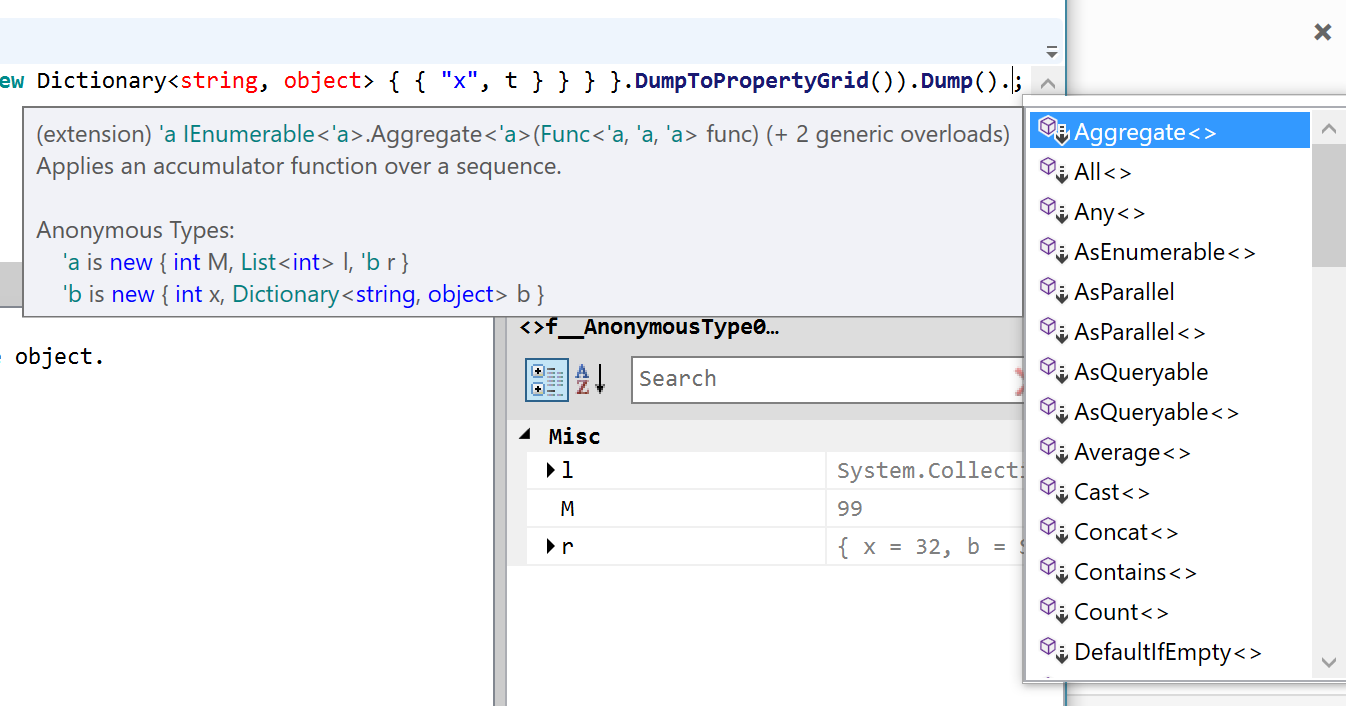
  <li>Code completion and signature help provide an experience much more similar to VS:</li>
</ul>

<p><img src="/attachments/2016/02/completion.png" alt="" /></p>

<p><img src="/attachments/2016/02/signature-help.png" alt="" /></p>

<ul>
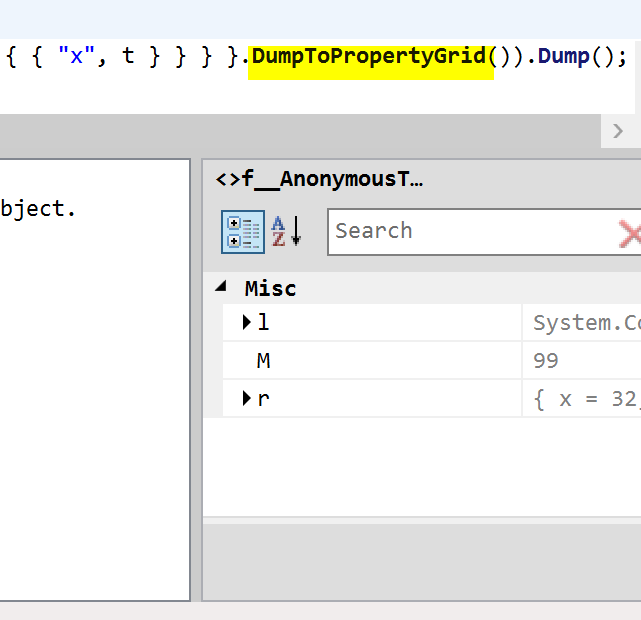
  <li>A new <code class="language-plaintext highlighter-rouge">DumpToPropertyGrid</code> extension method:</li>
</ul>

<p><img src="/attachments/2016/02/dump-to-property-grid.png" alt="dumptoprop" width="300" /></p>

<ul>
  <li>Improved performance, formatting and new glyph icons (courtesy of the now XAML-friendly <a href="https://www.microsoft.com/en-us/download/details.aspx?id=35825">VS Image Library</a>)</li>
</ul>]]></content><author><name></name></author><category term="C#" /><category term="Roslyn" /><category term="RoslynPad" /><summary type="html"><![CDATA[I have been waiting for while for the Roslyn team to expose the completion and signature help services so I could use them in RoslynPad without having to compile my own version. This was expected to be included in Update 1 but got pushed back.]]></summary></entry><entry><title type="html">Async-friendly stack traces</title><link href="https://arbel.net/2016/02/19/async-friendly-stack-traces/" rel="alternate" type="text/html" title="Async-friendly stack traces" /><published>2016-02-19T09:34:08+00:00</published><updated>2016-02-19T09:34:08+00:00</updated><id>https://arbel.net/2016/02/19/async-friendly-stack-traces</id><content type="html" xml:base="https://arbel.net/2016/02/19/async-friendly-stack-traces/"><![CDATA[<p>If you’re using async/await a lot (a given nowadays), you may have noticed stack traces are not very readable. For example, this is the stack trace of a chain of async methods:</p>

<!--more-->

<div class="language-plaintext highlighter-rouge"><div class="highlight"><pre class="highlight"><code>System.Exception: Crash! Boom! Bang!
at AsyncFriendlyStackTrace.Test.Example1.&lt;C&gt;d__3.MoveNext() in C:\Source\Repos\AsyncFriendlyStackTrace\src\AsyncFriendlyStackTrace.Test\Example1.cs:line 26
--- End of stack trace from previous location where exception was thrown ---
at System.Runtime.CompilerServices.TaskAwaiter.ThrowForNonSuccess(Task task)
at System.Runtime.CompilerServices.TaskAwaiter.HandleNonSuccessAndDebuggerNotification(Task task)
at AsyncFriendlyStackTrace.Test.Example1.&lt;B&gt;d__2.MoveNext() in C:\Source\Repos\AsyncFriendlyStackTrace\src\AsyncFriendlyStackTrace.Test\Example1.cs:line 20
--- End of stack trace from previous location where exception was thrown ---
at System.Runtime.CompilerServices.TaskAwaiter.ThrowForNonSuccess(Task task)
at System.Runtime.CompilerServices.TaskAwaiter.HandleNonSuccessAndDebuggerNotification(Task task)
at AsyncFriendlyStackTrace.Test.Example1.&lt;A&gt;d__1.MoveNext() in C:\Source\Repos\AsyncFriendlyStackTrace\src\AsyncFriendlyStackTrace.Test\Example1.cs:line 15
--- End of stack trace from previous location where exception was thrown ---
at System.Runtime.CompilerServices.TaskAwaiter.ThrowForNonSuccess(Task task)
at System.Runtime.CompilerServices.TaskAwaiter.HandleNonSuccessAndDebuggerNotification(Task task)
at AsyncFriendlyStackTrace.Test.Example1.&lt;Run&gt;d__0.MoveNext() in C:\Source\Repos\AsyncFriendlyStackTrace\src\AsyncFriendlyStackTrace.Test\Example1.cs:line 10
--- End of stack trace from previous location where exception was thrown ---
at System.Runtime.CompilerServices.TaskAwaiter.ThrowForNonSuccess(Task task)
at System.Runtime.CompilerServices.TaskAwaiter.HandleNonSuccessAndDebuggerNotification(Task task)
at AsyncFriendlyStackTrace.Test.Program.Run[TExample](TextWriter writer) in C:\Source\Repos\AsyncFriendlyStackTrace\src\AsyncFriendlyStackTrace.Test\Program.cs:line 45
</code></pre></div></div>

<p>I’ve been using Service Fabric lately, and async is used everywhere. It made the logs hard to read and larger than they should be.</p>

<p>So (after some <a href="https://github.com/dotnet/runtime/issues/4996">deliberation</a> with a Microsoft diagnostics engineer) I decided to create a library that formats stack traces much more concisely:</p>

<p><a href="https://github.com/aelij/AsyncFriendlyStackTrace">AsyncFriendlyStackTrace</a></p>

<p>Usage is a single extension method call:</p>

<div class="language-csharp highlighter-rouge"><div class="highlight"><pre class="highlight"><code><span class="n">exception</span><span class="p">.</span><span class="nf">ToAsyncString</span><span class="p">()</span>
</code></pre></div></div>

<p>Here’s what the above stack trace would look like:</p>

<div class="language-plaintext highlighter-rouge"><div class="highlight"><pre class="highlight"><code>System.Exception: Crash! Boom! Bang!
at async AsyncFriendlyStackTrace.Test.Example1.C(?) in C:\Source\Repos\AsyncFriendlyStackTrace\src\AsyncFriendlyStackTrace.Test\Example1.cs:line 26
at async AsyncFriendlyStackTrace.Test.Example1.B(?) in C:\Source\Repos\AsyncFriendlyStackTrace\src\AsyncFriendlyStackTrace.Test\Example1.cs:line 20
at async AsyncFriendlyStackTrace.Test.Example1.A(?) in C:\Source\Repos\AsyncFriendlyStackTrace\src\AsyncFriendlyStackTrace.Test\Example1.cs:line 15
at async AsyncFriendlyStackTrace.Test.Example1.Run(?) in C:\Source\Repos\AsyncFriendlyStackTrace\src\AsyncFriendlyStackTrace.Test\Example1.cs:line 10
at AsyncFriendlyStackTrace.Test.Program.Run[TExample](TextWriter writer) in C:\Source\Repos\AsyncFriendlyStackTrace\src\AsyncFriendlyStackTrace.Test\Program.cs:line 45
</code></pre></div></div>

<p>Try the library, review the motivating examples in the repo, and let me know what you think. If this gets enough traction perhaps Microsoft could be convinced to add an extensibility point that would allow changing the default stack trace format.</p>

<p><strong>Update:</strong> Since .NET 6, the runtime formats async stack traces concisely out of the box, so this library is no longer needed and its repo has been archived.</p>]]></content><author><name></name></author><summary type="html"><![CDATA[Async stack traces are long and noisy, full of state machine and awaiter frames. Here is a library that formats them much more concisely.]]></summary></entry><entry><title type="html">Adding headers and instrumentation to Service Fabric default comm. stack</title><link href="https://arbel.net/2015/12/11/adding-headers-and-instrumentation-to-service-fabrics-default-comm-stack/" rel="alternate" type="text/html" title="Adding headers and instrumentation to Service Fabric default comm. stack" /><published>2015-12-11T10:31:46+00:00</published><updated>2015-12-11T10:31:46+00:00</updated><id>https://arbel.net/2015/12/11/adding-headers-and-instrumentation-to-service-fabrics-default-comm-stack</id><content type="html" xml:base="https://arbel.net/2015/12/11/adding-headers-and-instrumentation-to-service-fabrics-default-comm-stack/"><![CDATA[<p><strong>Update</strong></p>

<p>With Service Fabric SDK v2 this became much simpler. Check out this <a href="http://stackoverflow.com/a/34221661/276083">SO answer</a> of mine for details.</p>

<!--more-->

<hr />

<p>Service Fabric’s default communication stack for Reliable Services provides a simple way to enable communications without worrying about protocols, discovery, and much more as we shall see. To use the stack, we need to create a <code class="language-plaintext highlighter-rouge">ServiceRemotingListener</code>, which implements <code class="language-plaintext highlighter-rouge">ICommunicationListener</code>, as well as create a service interface:</p>

<div class="language-csharp highlighter-rouge"><div class="highlight"><pre class="highlight"><code><span class="k">interface</span> <span class="nc">IMyService</span> <span class="p">:</span> <span class="n">IService</span>
<span class="p">{</span>
    <span class="n">Task</span><span class="p">&lt;</span><span class="n">MyData</span><span class="p">&gt;</span> <span class="nf">DoIt</span><span class="p">();</span>
<span class="p">}</span>

<span class="k">class</span> <span class="nc">MyService</span> <span class="p">:</span> <span class="n">StatelessService</span><span class="p">,</span> <span class="n">IMyService</span>
<span class="p">{</span>
    <span class="k">protected</span> <span class="k">override</span> <span class="n">IEnumerable</span> <span class="nf">CreateServiceInstanceListeners</span><span class="p">()</span>
    <span class="p">{</span>
        <span class="k">return</span> <span class="k">new</span><span class="p">[]</span> <span class="p">{</span> <span class="k">new</span> <span class="nf">ServiceInstanceListener</span><span class="p">(</span><span class="n">parameters</span> <span class="p">=&gt;</span> <span class="k">new</span> <span class="nf">ServiceRemotingListener</span><span class="p">(</span><span class="n">parameters</span><span class="p">,</span> <span class="k">this</span><span class="p">))</span> <span class="p">};</span>
    <span class="p">}</span>

    <span class="k">public</span> <span class="n">Task</span><span class="p">&lt;</span><span class="n">MyData</span><span class="p">&gt;</span> <span class="nf">DoIt</span><span class="p">()</span>
    <span class="p">{</span>
        <span class="k">return</span> <span class="n">Task</span><span class="p">.</span><span class="nf">FromResult</span><span class="p">(</span><span class="k">new</span> <span class="nf">MyData</span><span class="p">());</span>
    <span class="p">}</span>
<span class="p">}</span>
</code></pre></div></div>

<p>Then, to use the service, we can create a proxy using <code class="language-plaintext highlighter-rouge">ServiceProxy</code>:</p>

<div class="language-csharp highlighter-rouge"><div class="highlight"><pre class="highlight"><code><span class="kt">var</span> <span class="n">myService</span> <span class="p">=</span> <span class="n">ServiceProxy</span><span class="p">.</span><span class="n">Create</span><span class="p">&lt;</span><span class="n">IMyService</span><span class="p">&gt;();</span>
<span class="k">await</span> <span class="n">myService</span><span class="p">.</span><span class="nf">DoIt</span><span class="p">();</span>
</code></pre></div></div>

<p>However, what the stack doesn’t <em>trivially</em> provide are hooks for adding headers and instrumentation for the service operations. Headers are essential in modern SO architectures. They can allow ambient information such as identity to pass along messages. Instrumentation allows you to add code when a service operation starts and ends. This could be used for logging, error handling, authorization and more. In this post I will share a solution for adding both of these.</p>

<h2 id="get-the-code">Get the code</h2>

<p>This sample is no longer relevant with SDK v2 and has been removed</p>

<p><del><a href="https://github.com/aelij/samples-servicefabric-instrumentation">https://github.com/aelij/samples-servicefabric-instrumentation</a></del></p>

<h2 id="how-it-works">How it works</h2>

<p>In the latest preview, two additions were made to the service API that enable this – both <code class="language-plaintext highlighter-rouge">ServiceRemotingListener</code> and <code class="language-plaintext highlighter-rouge">ServiceProxy</code> now accept a factory that allows us to construct the “inner” communication listener and client. What does this mean? Both the listener and the proxy are higher level abstractions, and they use inner classes to provide the actual communication layer. By default, Service Fabric uses WCF. All of this implementation is internal, so in the sample code you’ll see a replica of that internal code with the added hooks.</p>

<p>The heart of the solution relies on the <code class="language-plaintext highlighter-rouge">WcfRemotingService</code> class, which is the implementation of the WCF service. This class receives generic messages, in the form of a byte array, later to be decoded and dispatched into our implementation (e.g. the <code class="language-plaintext highlighter-rouge">MyService</code> class above). So, essentially, we can add any code before and after the execution of the method.</p>

<p>Service Fabric uses the class <code class="language-plaintext highlighter-rouge">ServiceRemotingMessageHeaders</code> to send metadata about which interface and method were called. This data is encoded into integer hashes of the names. The sample code also shows how to decode this data for logging purposes. This could be very useful for other uses, such as extracting attributes from the methods, and applying policy according to them. In addition, we can add our own headers. In the sample, I’ve added the <code class="language-plaintext highlighter-rouge">ClaimsIdentity</code> of the client to the headers. I’m using a neat .NET 4.6 class called <code class="language-plaintext highlighter-rouge">AsyncLocal&lt;T&gt;</code> to allow the context to flow between awaits (note that 4.6 is not installed on Service Fabric clusters by default, and requires additional setup).</p>

<p>The other part of the solution is the client side, in the <code class="language-plaintext highlighter-rouge">WcfServiceRemotingClient</code> class. That is where we add the headers before sending requests to the server.</p>

<h2 id="how-to-use-it">How to use it</h2>

<p>In the sample code above, simply replace <code class="language-plaintext highlighter-rouge">new ServiceRemotingListener</code> with <code class="language-plaintext highlighter-rouge">ServiceRemotingListenerEx.Create</code> and <code class="language-plaintext highlighter-rouge">ServiceProxy</code> with <code class="language-plaintext highlighter-rouge">ServiceProxyEx</code>. This will enable the custom listener and client.</p>]]></content><author><name></name></author><category term="Service Fabric" /><summary type="html"><![CDATA[Update With Service Fabric SDK v2 this became much simpler. Check out this SO answer of mine for details.]]></summary></entry><entry><title type="html">Windows Performance Monitor – Reimagined</title><link href="https://arbel.net/2015/07/23/windows-performance-monitor-reimagined/" rel="alternate" type="text/html" title="Windows Performance Monitor – Reimagined" /><published>2015-07-23T16:31:36+00:00</published><updated>2015-07-23T16:31:36+00:00</updated><id>https://arbel.net/2015/07/23/windows-performance-monitor-reimagined</id><content type="html" xml:base="https://arbel.net/2015/07/23/windows-performance-monitor-reimagined/"><![CDATA[<p>Windows PerfMon is an invaluable tool, but it’s UI remained the same for years, stuck somewhere in the 1990’s. This is my attempt at “reimagining” it.</p>

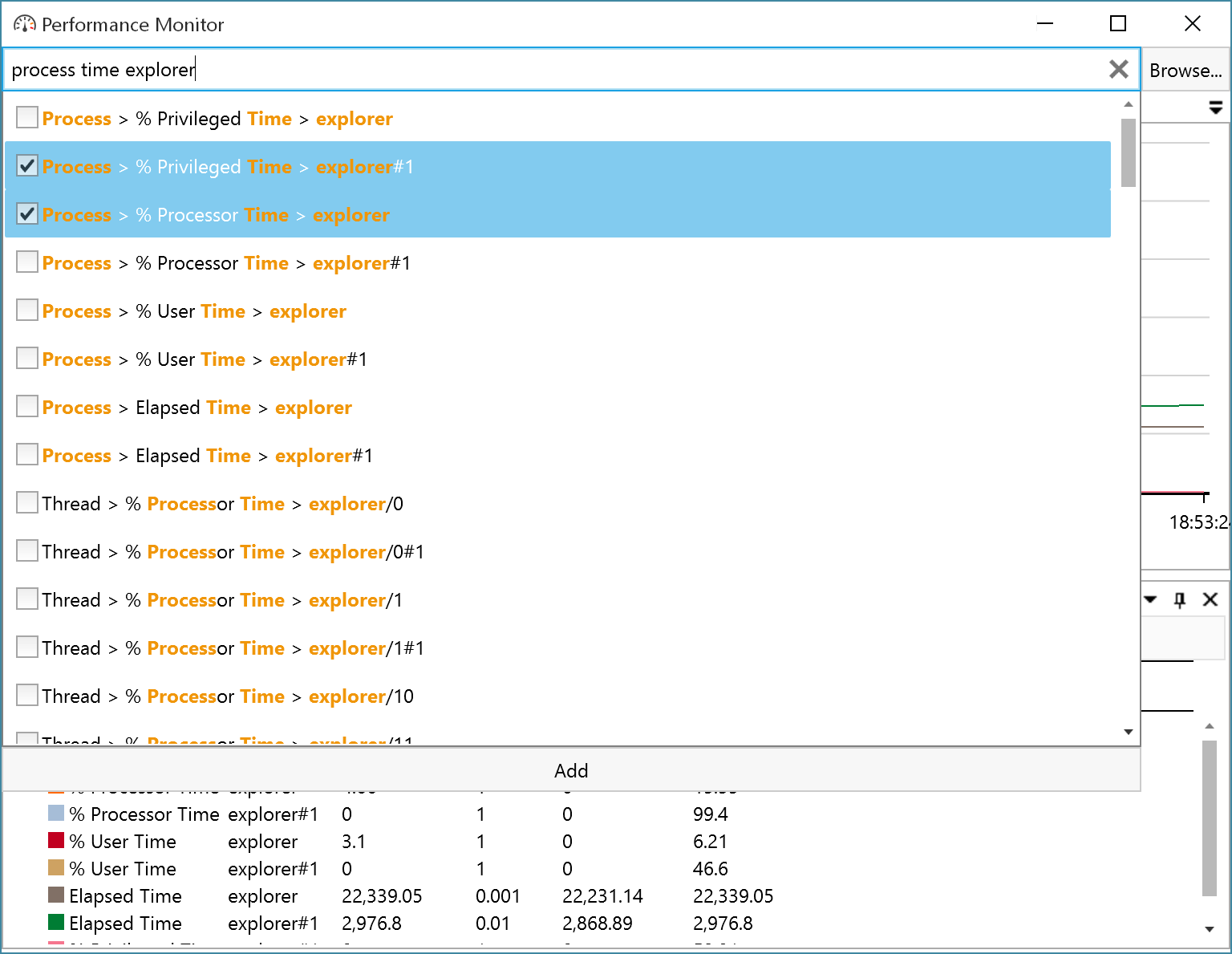
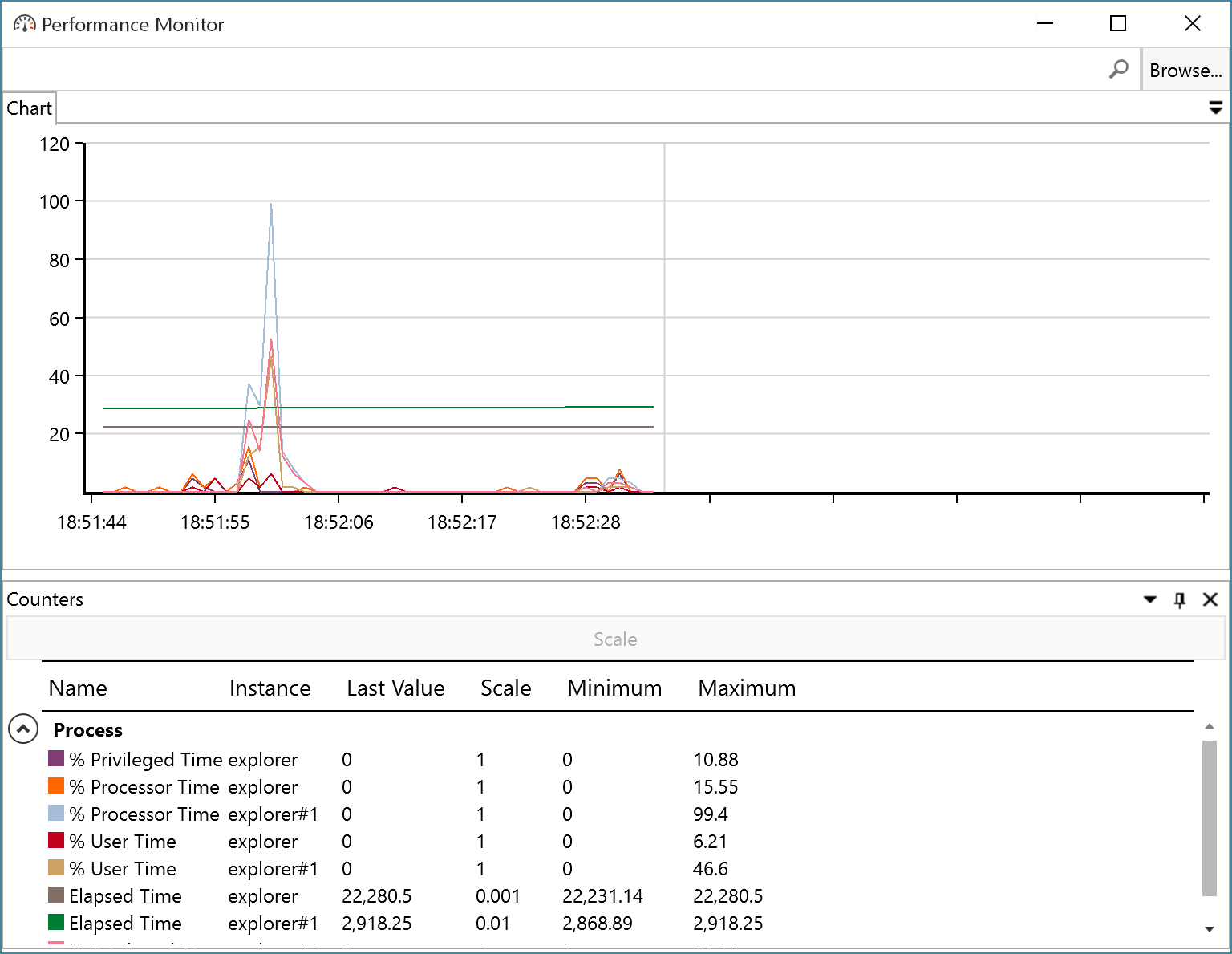
<!--more-->

<p>Note the edges are still rough (think version 0.1), and it’s still missing a lot of features the original tool has. I welcome criticism and ideas; please use GitHub Issues for those.</p>

<table>
  <tbody>
    <tr>
      <td><a href="https://github.com/aelij/PerformanceMonitor">https://github.com/aelij/PerformanceMonitor</a></td>
      <td><a href="https://github.com/aelij/PerformanceMonitor/releases/download/0.1/PerformanceMonitor-0.1.zip">Binaries</a></td>
    </tr>
  </tbody>
</table>

<h2 id="screenshots">Screenshots</h2>

<p><img src="https://raw.githubusercontent.com/aelij/PerformanceMonitor/master/content/screenshot2.png" alt="" /></p>

<p><img src="https://raw.githubusercontent.com/aelij/PerformanceMonitor/master/content/screenshot1.png" alt="" /></p>]]></content><author><name></name></author><category term="GitHub" /><category term="Performance" /><category term="WPF" /><summary type="html"><![CDATA[Windows PerfMon is an invaluable tool, but it’s UI remained the same for years, stuck somewhere in the 1990’s. This is my attempt at “reimagining” it.]]></summary></entry><entry><title type="html">RoslynPad Reloaded</title><link href="https://arbel.net/2015/04/01/roslynpad-reloaded/" rel="alternate" type="text/html" title="RoslynPad Reloaded" /><published>2015-04-01T21:14:35+00:00</published><updated>2015-04-01T21:14:35+00:00</updated><id>https://arbel.net/2015/04/01/roslynpad-reloaded</id><content type="html" xml:base="https://arbel.net/2015/04/01/roslynpad-reloaded/"><![CDATA[<p><strong><a href="/2016/02/22/roslynpad-01/">Updated Post</a></strong></p>

<!--more-->

<p>A <a href="/2013/05/11/roslynpad/" title="RoslynPad">while back</a> I created a small sample that exposed the Roslyn code completion (a.k.a. Intellisense) APIs via Reflection. This was during the CTP days of Roslyn, and I hoped these APIs would become public when Roslyn hits RTM.</p>

<p>Much has changed in Roslyn during these past two years, and I wanted to update the sample. The completion APIs are still internal, but fortunately now Roslyn is an open-source project. I compiled my own version, and exposed both <strong>ICompletionService</strong> and <strong>ISignatureHelpProvider</strong>. The latter allows me to display method signatures and overloads. I’ve created a new assembly, <em>Microsoft.CodeAnalysis.EditorFeatures.Minimal</em> in lieu of <em>Microsoft.CodeAnalysis.EditorFeatures</em> that does not depend on Visual Studio’s (proprietary) assemblies.</p>

<p>Download the sources (with the modified Roslyn binaries) from</p>

<p><a href="https://github.com/aelij/roslynpad">https://github.com/aelij/roslynpad</a></p>]]></content><author><name></name></author><category term="C#" /><category term="Roslyn" /><category term="RoslynPad" /><summary type="html"><![CDATA[Updated Post]]></summary></entry><entry><title type="html">To ConfigureAwait or not to ConfigureAwait?</title><link href="https://arbel.net/2014/09/21/configureawait-or-not/" rel="alternate" type="text/html" title="To ConfigureAwait or not to ConfigureAwait?" /><published>2014-09-21T14:04:42+00:00</published><updated>2014-09-21T14:04:42+00:00</updated><id>https://arbel.net/2014/09/21/configureawait-or-not</id><content type="html" xml:base="https://arbel.net/2014/09/21/configureawait-or-not/"><![CDATA[<p>When <strong>await</strong>ing tasks in C#, you have the option to configure how the continuation behaves - whether it uses the Synchronization Context or not.</p>

<!--more-->

<p>This can be pretty important, especially when awaiting tasks in code that was initialized from a UI thread, which has a Synchronization Context. Poorly written code can easily result in a deadlock, not to mention a serious perf hit. For example:</p>

<div class="language-csharp highlighter-rouge"><div class="highlight"><pre class="highlight"><code>
<span class="k">class</span> <span class="nc">MyWindow</span> <span class="p">:</span> <span class="n">Window</span>
<span class="p">{</span>
    <span class="k">private</span> <span class="k">void</span> <span class="nf">MyButton_Click</span><span class="p">(</span><span class="kt">object</span> <span class="n">sender</span><span class="p">,</span> <span class="n">EventArgs</span> <span class="n">e</span><span class="p">)</span>
    <span class="p">{</span>
        <span class="nf">DoSomething</span><span class="p">().</span><span class="nf">Wait</span><span class="p">();</span>
    <span class="p">}</span>

    <span class="k">private</span> <span class="k">async</span> <span class="n">Task</span> <span class="nf">DoSomething</span><span class="p">()</span>
    <span class="p">{</span>
        <span class="k">await</span> <span class="n">Task</span><span class="p">.</span><span class="nf">Run</span><span class="p">(()</span> <span class="p">=&gt;</span> <span class="p">{</span> <span class="p">});</span>
    <span class="p">}</span>
<span class="p">}</span>
</code></pre></div></div>

<p>This is obviously bad, calling Wait() on the UI thread. But it’s easy to imagine more subtle ways this could happen inside library code. That’s why the best practice is to <strong>always</strong> use <strong>ConfigureAwait(continueOnCapturedContext: false)</strong> in library code. I really wish they’d split that into two separate methods. I also wish they’d made the default to be <strong>false</strong>.</p>

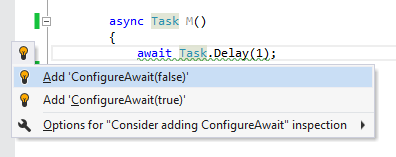
<p>I’ve recently come to the conclusion that it’s best to always specify ConfigureAwait <strong>everywhere</strong> lest you forget. So I wrote up a small ReSharper plugin (my first) that checks for it and also provides a quick-fix (ReSharper provides an awesome extensibility model):</p>

<p><img src="/attachments/2014/09/configure-await-resharper.png" alt="ConfigureAwait Checker for ReSharper" /></p>

<p>Download it from the ReSharper extensions gallery: <a href="http://resharper-plugins.jetbrains.com/packages/ConfigureAwaitChecker">http://resharper-plugins.jetbrains.com/packages/ConfigureAwaitChecker</a></p>

<p>ReSharper 9 (different package): <a href="https://resharper-plugins.jetbrains.com/packages/ConfigureAwaitChecker.v9">https://resharper-plugins.jetbrains.com/packages/ConfigureAwaitChecker.v9</a></p>]]></content><author><name></name></author><category term="Async" /><category term="C#" /><category term="ReSharper" /><summary type="html"><![CDATA[When awaiting tasks in C#, you have the option to configure how the continuation behaves - whether it uses the Synchronization Context or not.]]></summary></entry><entry><title type="html">The Misbehaving Dialog</title><link href="https://arbel.net/2014/04/23/the-misbehaving-dialog/" rel="alternate" type="text/html" title="The Misbehaving Dialog" /><published>2014-04-23T08:55:23+00:00</published><updated>2014-04-23T08:55:23+00:00</updated><id>https://arbel.net/2014/04/23/the-misbehaving-dialog</id><content type="html" xml:base="https://arbel.net/2014/04/23/the-misbehaving-dialog/"><![CDATA[<h2 id="windows-dialogs-can-be-bad-for-your-app">Windows’ dialogs can be bad for your app</h2>

<!--more-->

<ul>
  <li>They don’t allow you to resize, minimize or do anything with the containing window</li>
  <li>As a consequence of the above, when you use WIN+D to show the desktop, then open another window, they suddenly pop back up from nowhere (along with the containing window, of course)</li>
  <li>You can’t have dialogs that are context-specific (e.g. a certain tab)</li>
  <li>They misbehave if you don’t set their parent explicitly (sometimes hiding behind other windows, accessible only via crazy ALT-tabbing)</li>
  <li>They make that annoying ‘ding’ sound when you click the containing window</li>
</ul>

<h2 id="theres-a-better-way">There’s a better way</h2>

<p><strong>InlineModalDialog</strong>, available in the latest version of <a href="https://www.nuget.org/packages/AvalonLibrary">WPF Contrib,</a> works a bit differently:</p>

<ul>
  <li>It creates an <em>inline</em> dialog that is contained within the window</li>
  <li>It constrains the input (keyboard, mouse &amp; touch) to the dialog; WPF can easily do that with its sophisticated keyboard navigation options and hit-testing invisibility</li>
  <li>It uses a Dispatcher frame to block the caller of the Show() method, just like a regular dialog does</li>
  <li>You can layer dialogs on top of each other</li>
  <li>You can define multiple scopes in which the dialogs appear</li>
</ul>

<h2 id="how-to-use">How to use</h2>

<p>Add the decorator below the element to be used as the container. Set the <strong>Target</strong> property to the container.</p>

<div class="language-xml highlighter-rouge"><div class="highlight"><pre class="highlight"><code><span class="nt">&lt;UserControl</span> <span class="na">xmlns=</span><span class="s">"http://schemas.microsoft.com/winfx/2006/xaml/presentation"</span>
             <span class="na">xmlns:x=</span><span class="s">"http://schemas.microsoft.com/winfx/2006/xaml"</span>
             <span class="na">xmlns:av=</span><span class="s">"http://schemas.codeplex.com/wpfcontrib/xaml/presentation"</span>
             <span class="na">Name=</span><span class="s">"RootContainer"</span><span class="nt">&gt;</span>
    <span class="nt">&lt;av:InlineModalDecorator</span> <span class="na">Target=</span><span class="s">"{x:Reference RootContainer}"</span><span class="nt">&gt;</span>

    <span class="nt">&lt;/av:InlineModalDecorator&gt;</span>
<span class="nt">&lt;/UserControl&gt;</span>
</code></pre></div></div>

<p>Create a dialog and show it:</p>

<div class="language-csharp highlighter-rouge"><div class="highlight"><pre class="highlight"><code><span class="kt">var</span> <span class="n">dialog</span> <span class="p">=</span> <span class="k">new</span> <span class="n">InlineModalDialog</span>
<span class="p">{</span>
    <span class="n">Owner</span> <span class="p">=</span> <span class="k">this</span><span class="p">,</span>
    <span class="n">Content</span> <span class="p">=</span> <span class="k">new</span> <span class="nf">MyDialogViewModel</span><span class="p">(),</span>
<span class="p">};</span>
<span class="n">dialog</span><span class="p">.</span><span class="nf">Show</span><span class="p">();</span>
</code></pre></div></div>

<p>The <strong>Owner</strong> can be any element contained within the <strong>Target</strong> specified in the decorator (or the target itself).</p>

<p>You may also use the new <strong>ShowInline()</strong> overloads in <strong>TaskDialog</strong>.</p>

<p>##</p>

<h2 id="limitations">Limitations</h2>

<ul>
  <li>In the current implementation, you can’t move or resize the dialogs (but they can be resized with the container using stretching and margins). This can be easily mitigated, and I may address it in a future release.</li>
  <li>The developer needs to be more aware of the dialogs’ state, especially when these are dialogs that are shown when closing a window. For example, what happens if, while editing a document, the user has opened a settings dialog and clicks the window’s close button? Should you ask whether to save the settings? Save the document? Ignore/disable it? It’s up to you to decide what’s the better UX.</li>
</ul>]]></content><author><name></name></author><category term="WPFContrib" /><summary type="html"><![CDATA[Windows’ dialogs can be bad for your app]]></summary></entry><entry><title type="html">Processing Raw Input in WPF</title><link href="https://arbel.net/2014/04/09/processing-raw-input-in-wpf/" rel="alternate" type="text/html" title="Processing Raw Input in WPF" /><published>2014-04-09T11:44:17+00:00</published><updated>2014-04-09T11:44:17+00:00</updated><id>https://arbel.net/2014/04/09/processing-raw-input-in-wpf</id><content type="html" xml:base="https://arbel.net/2014/04/09/processing-raw-input-in-wpf/"><![CDATA[<p>One of my clients recently needed to hook up a USB barcode reader to their app. Input from the reader needed to be redirected and handled by a special service, and ignored by the rest of the application. WPF has a property named <strong>Device</strong> in its <strong>KeyEventArgs</strong> class, but unfortunately it turns out that it uses the same instance for all input devices hooked up to the PC.</p>

<!--more-->

<p>So I set out to look for a solution. It seems that normally Windows does not provide this information in <strong>WM_KEY{UP, DOWN}</strong> messages. You had to register your process to receive <strong>WM_INPUT</strong> messages, which contain information about which HID (Human Interface Device) was used. These messages are sent <em>in addition</em> to the standard input messages (keyboard, mouse, touch).</p>

<p>I found a good project in <a href="http://www.codeproject.com/Articles/17123/Using-Raw-Input-from-C-to-handle-multiple-keyboard">Code Project</a> that encapsulated most of the functionality I needed.</p>

<p><a href="https://github.com/aelij/RawInputProcessor">https://github.com/aelij/RawInputProcessor</a></p>

<p>This solution contains a unified API for both WPF and Windows Forms. It also allows marking events as <em>handled</em>. It uses the <strong>PeekMessage</strong> function to remove the <strong>WM_KEY{UP, DOWN}</strong> messages, so WPF’s <strong>InputManager</strong> never receives them. I’ve also cleaned up the code and fixed a few bugs and a few possible leaks.</p>]]></content><author><name></name></author><category term="WPF" /><summary type="html"><![CDATA[One of my clients recently needed to hook up a USB barcode reader to their app. Input from the reader needed to be redirected and handled by a special service, and ignored by the rest of the application. WPF has a property named Device in its KeyEventArgs class, but unfortunately it turns out that it uses the same instance for all input devices hooked up to the PC.]]></summary></entry></feed>